
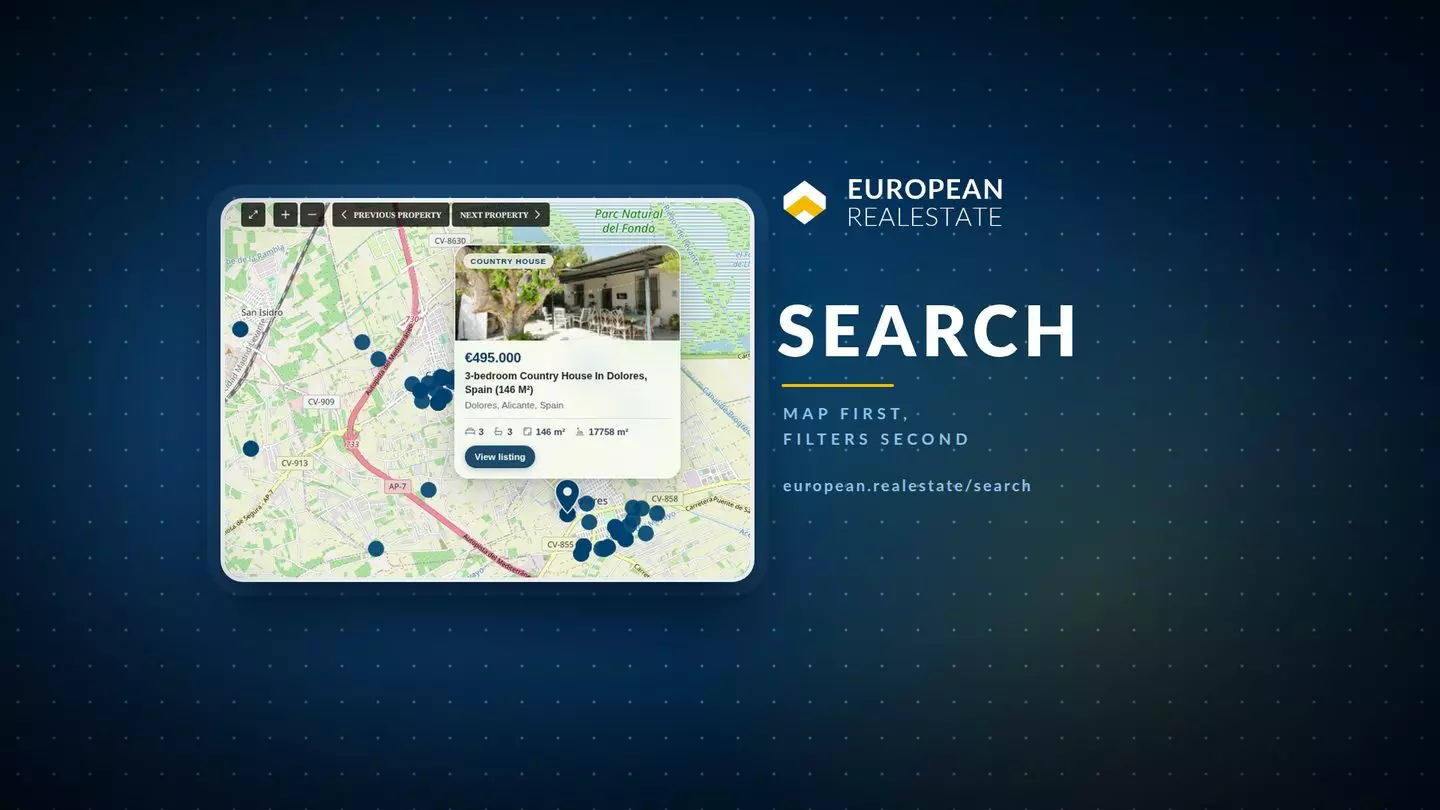
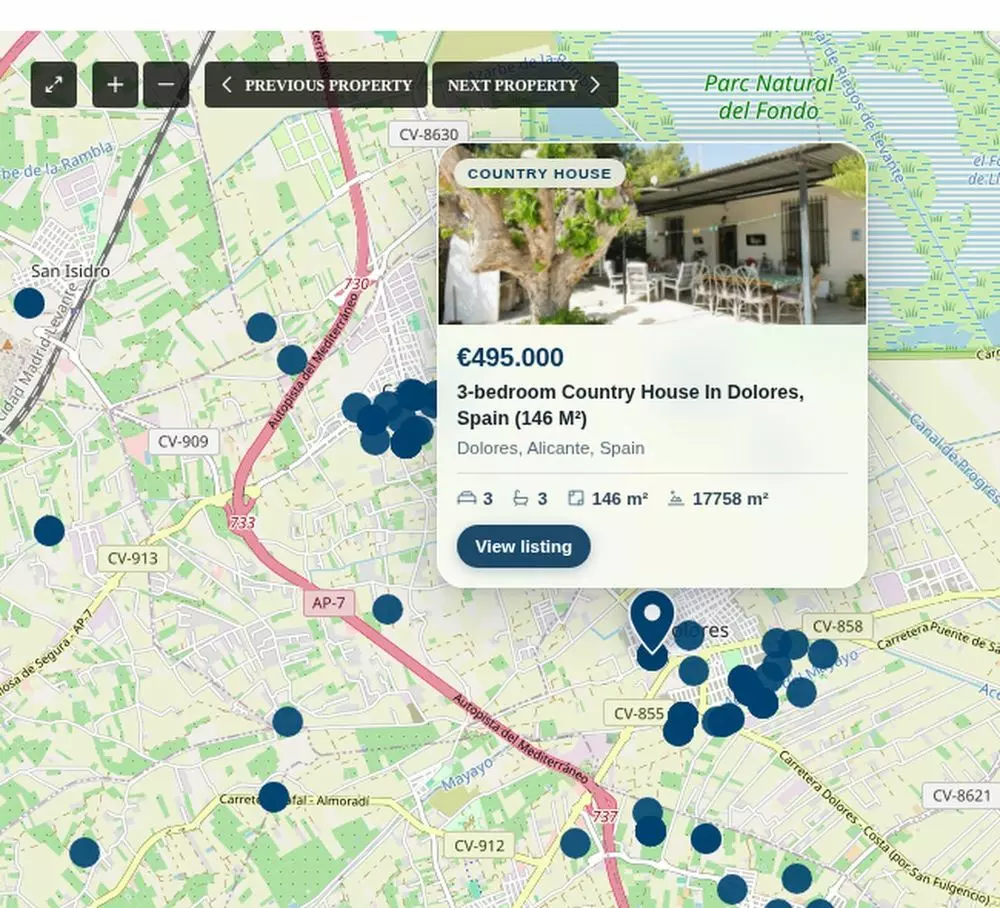
Search on european.realestate now starts at the map. Pick a country, a price band or nothing at all, and the page fills the map with dark navy dots as the listing data arrives. Zoom in and the dots stay where they are. Hover one and a card opens with the photo, the price, the title and the address of that home, with a pin dropped on the exact spot it belongs to.
The Map Now Answers Before the List Does
Page load now sends the map request as soon as the module runs, before the results column has asked for anything. On a country-wide view the dots then arrive in stages rather than all at once, so the picture builds up while the visitor is already reading the map. Whatever was on screen before stays there until the first batch of the new picture is ready, which is what stops the map flashing empty on every zoom step.
Below 250 homes in view, every dot becomes a target. Hovering one opens a card with the asking price, the property type, the address and the main figures, and the card’s two links open in a new tab, so the search stays where the visitor left it. Above that number the dots stay small and quiet: one card per home in a view holding thousands of them is unreadable, and at that distance the dots are there to show where the stock sits, not to be clicked. Map tiles and the dot layer run on Leaflet with map data from OpenStreetMap, which is why the attribution sits in the bottom corner.
A Country Filter That Shows the Whole Country
Choosing a country in the filter now puts the whole country in view. Before, the map fitted itself to the first 250 markers the theme had loaded, and on Spain that is a coastal strip around Alicante, so a buyer who asked for Spain got a province. Country boxes come from Natural Earth outlines, public domain data, and 37 of the countries in that field carry one.
Dragging the map into a neighbouring country does something too. The country field follows the map, the address bar is rewritten with the five viewport values that describe the new view, and the results reload for that country. A link copied from the address bar opens the same country at the same position and zoom, which is the part that matters when estate agents send a search to a client. A typed location or a keyword still wins over the country box: the country only decides the view when it is the only thing set.
Draw the Area You Mean and Keep It in an Alert
On the map there is a draw button in the control row next to the previous and next property buttons. It lets a visitor trace a polygon around the streets they mean, and the results are then restricted by a spatial test against that polygon: in the ordinary property search, in the half-map view and in the AI search. A drawing that fails to close matches nothing instead of matching everything, which is the fail-closed choice. An empty list is a bug report; a list of the entire continent dressed up as an answer is a lie.
The same area can be saved into an email alert, and the mail says the location is approximate, because a hand-drawn ring is not a municipal boundary. Alert machinery was rebuilt in September: duplicate stored rows are collapsed, each new match is mailed once instead of once per stored row, and an alert built on a drawn area follows that area rather than a radius. In the search bar the same job has its own button, Set email alert for this search, so a saved search no longer depends on finding the right page afterwards.
What Changed, When, and What It Replaces
The table below is the short version. Each row was measured on the live page before and after the change.
| Part of the page | What it does now, and what it replaced |
|---|---|
| Dots | Navy dots at every zoom level, built up in stages, with the old view kept until the new one is ready. Before, the map swapped to counted cells and one late response could empty it. |
| Zoom | Your zoom and position hold through a search, a page click or a scroll. The theme used to reset the view to zoom 12 after every response. |
| Hover | One card with the photo, price, title and address, and a pin on the exact coordinate. It replaced the theme’s cluster legs and its own info window. |
| Country | The whole country in view, with a box for 37 countries. It used to fit the first 250 markers, which on Spain is one coastline. |
| Energy class | Back in both search bars, from A+ to H, with a guard that restores it on read. |
| Alerts | One mail per new match, area aware, with a line saying the location is approximate. Duplicate stored rows used to mail the same search repeatedly. |
Two smaller pieces came with it:
- The map’s loading bar is back, but only on the mobile map, where it was asked for. On desktop it stays out of the way.
- The pagination row under the results is a single frosted capsule on desktop instead of six loose buttons, which is a small thing until you have paged through forty results looking for the next one.
What Agents Can Do With It From This Week
Five things are directly usable, and each one shortens a working day:
- Save an alert on a drawn area when a client names streets rather than a town. The alert then follows the streets, not a circle around a postcode.
- Send a link instead of describing where to zoom. The position, the zoom and the country travel in the address bar.
- Screen with the hover card before opening anything, and keep the search open while you do it, because the links open in a new tab.
- Filter on energy class when a buyer asks about running costs. The field now survives the theme’s own settings saves, which it did not in September.
- Ask Eva in words when a client cannot turn a wish into filters. Spain, 2 bedrooms up to 300.000 euro is a valid starting point, and the map carries the answer.
None of this replaces the list. Detail lives in the list, along with the agent’s name and the contact buttons. The map is where the question lives, and the page now treats that as the order of business.
The Search Page Should Answer Like a Map
A map answers a different question from a list: a list says what is available, a map says where, how far apart and next to what. Searching European real estate is mostly the second question, and the old page tried to answer both at once and got in its own way. It fought the visitor’s zoom, it hid the stock behind counted cells, and it dropped the country a buyer had chosen.
This rebuild isn’t a redesign for its own sake. It is a decision about which of the two answers comes first, and the map goes first because the question a buyer asks is almost always spatial. That is also why the list has not gone anywhere: it still carries the detail, the agent and the contact buttons, and it still pages. What changed is that it follows the map instead of arguing with it.
Five Questions About the New Search Page
Is the page faster, or does it only look faster?
Both. Map requests no longer wait for the results list, so the dots are usually on screen before the first listing card is, and the drawing arrives in stages instead of in one jump. Server work behind a national view was already fast; the waiting used to sit in the order of the requests, not in the query.
Why do some dots open a card while others just sit there?
A count in view decides it. Under 250 homes, each dot is a target with a card. Above 250, the dots stay inert on purpose, because hundreds of overlapping cards on one screen help nobody.
Can I search only inside an area I draw myself?
Yes, on the map, and the area can be saved into an email alert as well. The filter and the alert use the same polygon, so a client who says “these four streets” gets those four streets and not the whole municipality.
What happens if I type a location and also pick a country?
The location wins. The country box only takes over the view when it is the only thing set, which is what stops the map from snapping back to a national view while someone is searching inside a city.
Where did the energy class filter go in September?
It vanished from both search bars because a theme options save rewrote the field list. It is back in both bars, from A+ to H, and a guard restores it whenever the stored options are read, so the next save cannot quietly remove it again.